

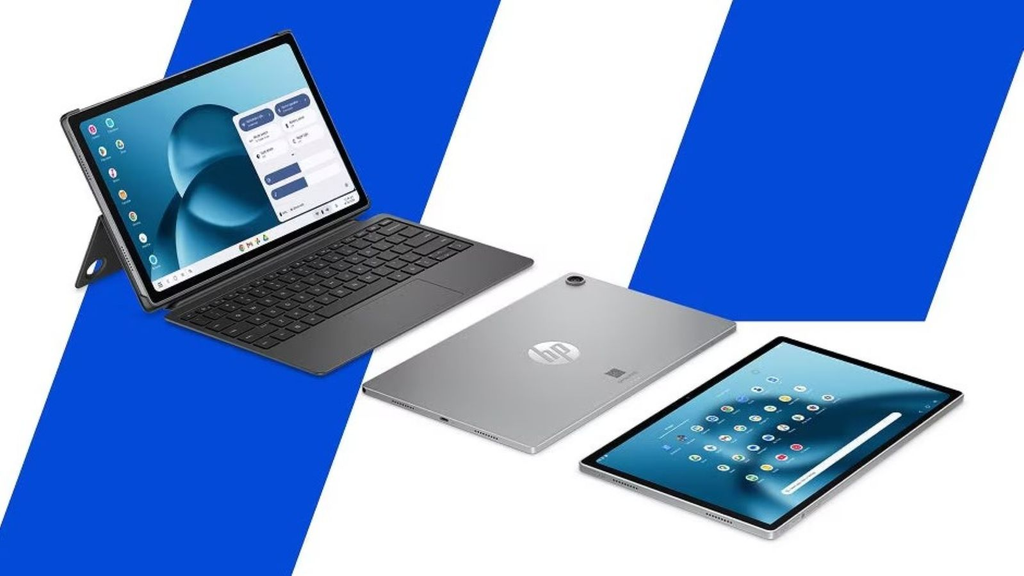
The HP OmniPad 12 is one of the more interesting 2-in-1 devices launched in India in 2026. Instead of following the traditional Windows laptop formula, HP has taken a tablet-first approach and added a detachable keyboard to create a more laptop-like experience.
With a 12-inch 2K touchscreen, Snapdragon processor, 8GB RAM, Android 16, 90Hz refresh rate, quad speakers and up to 18 hours of claimed battery life, the OmniPad 12 is clearly designed for students, professionals, families and small-business users who want something lighter and more flexible than a conventional laptop. (HP)
But there’s one important question:
Can the HP OmniPad 12 actually replace your work laptop?
The answer depends heavily on what kind of work you do.
In this detailed review, we’ll look at the performance, display, keyboard, battery, software, cameras, connectivity, productivity and real-world laptop replacement potential of the HP OmniPad 12.
HP OmniPad 12 Price in India
The HP OmniPad 12 launched in India at around ₹48,999 for the 8GB RAM and 128GB storage configuration. Gadgets 360 lists the India launch date as May 11, 2026, with the device becoming available for purchase in August. (Gadgets 360)
HP’s own India store currently lists the 128GB version at ₹48,999, while a 256GB configuration is listed at ₹54,999. Availability can vary by configuration. (HP)
That puts the OmniPad 12 in an interesting price category.
At around ₹49,000, buyers can also consider:
- Windows laptops
- iPads
- Samsung Galaxy tablets
- Android productivity tablets
- Traditional lightweight notebooks
So HP has to offer more than just a nice screen.
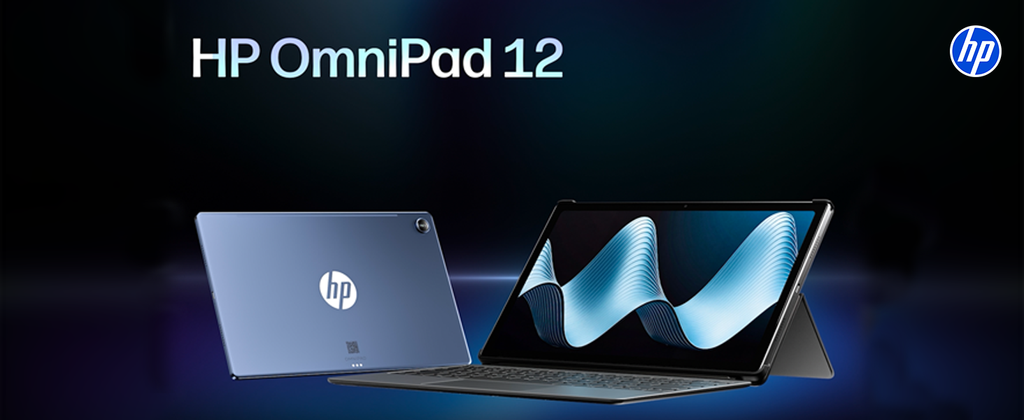
HP OmniPad 12 Specifications
| Feature | HP OmniPad 12 |
|---|---|
| Operating System | Android 16 |
| Processor | Qualcomm Snapdragon 6 Gen 3 / HP-listed SM6475Q |
| RAM | 8GB LPDDR5 |
| Storage | 128GB / 256GB UFS |
| Display | 12-inch 2K |
| Resolution | 2000 × 1200 |
| Refresh Rate | 90Hz |
| Brightness | 400 nits |
| Color | 100% sRGB |
| Rear Camera | 13MP |
| Front Camera | 8MP |
| Speakers | Quad speakers |
| Audio | DTS Audio |
| Wi-Fi | Wi-Fi 6E |
| Bluetooth | Bluetooth 5.2 |
| Expansion | microSD |
| Port | USB-C |
| Battery | 31Wh |
| Claimed Battery | Up to 18 hours |
| Keyboard | Detachable |
| Weight | About 600g tablet |
| Thickness | 7.3mm |
HP’s official specifications list an 8GB LPDDR5 configuration, 2K 90Hz display, Wi-Fi 6E, microSD expansion and 128GB/256GB storage options. (HP)
Design: Tablet First, Laptop Second
The first thing you’ll notice about the OmniPad 12 is that it doesn’t look like a traditional laptop.
It’s essentially a large tablet that can transform into a laptop-like workstation when you attach the keyboard.
HP describes the device as a combination of tablet flexibility and laptop-style productivity. (HP)
That approach has some major advantages.
You can use it:
As a tablet
Perfect for:
- YouTube
- Netflix
- Reading
- Browsing
- Social media
- Video calls
- Casual gaming
Then attach the keyboard when you need to:
- Write documents
- Send emails
- Work on spreadsheets
- Type long articles
- Attend online meetings
This flexibility is the main reason to consider the OmniPad 12.
Slim and Portable
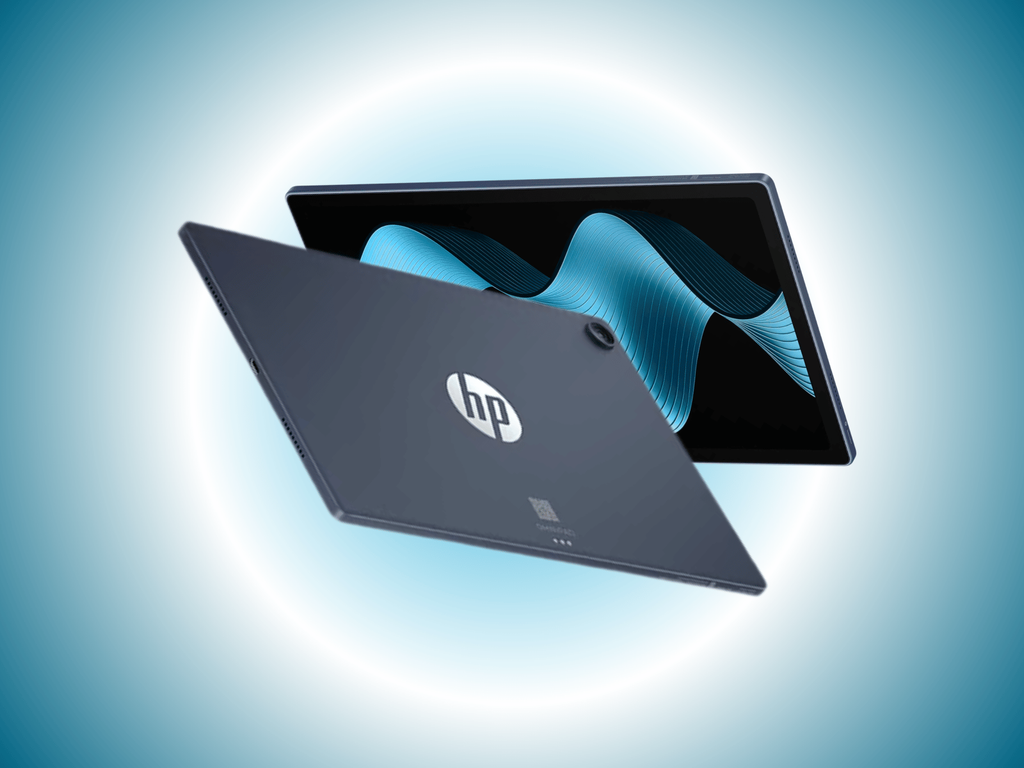
The tablet itself is around 7.3mm thick and approximately 600 grams, according to HP’s specifications. (HP)
That’s considerably more portable than many conventional laptops.
You can put the tablet into a backpack and carry it around without feeling like you’re taking a heavy workstation everywhere.
For students and people who work from cafés or while travelling, this can be a major advantage.
12-Inch 2K Display
The display is one of the strongest parts of the OmniPad 12.
HP gives you a:
12-inch 2K touchscreen
with a resolution of:
2000 × 1200 pixels
The panel also supports:
90Hz refresh rate
and up to:
400 nits brightness
with:
100% sRGB color coverage
according to HP. (HP)
Is the Display Good for Work?
Yes.
A 12-inch screen provides substantially more workspace than a typical smartphone or smaller tablet.
It’s particularly useful for:
- Documents
- Web browsing
- Emails
- Google Docs
- Online classes
- Presentations
- Video calls
- Reading PDFs
The 16:10 aspect ratio also gives you a useful amount of vertical space for productivity.
90Hz Refresh Rate
The 90Hz display is another nice touch.
Scrolling through websites and documents feels smoother than on a standard 60Hz panel.
You’ll notice it particularly when:
- Scrolling webpages
- Switching between apps
- Moving through social feeds
- Navigating menus
- Reading long documents
It isn’t a 120Hz panel, but 90Hz is still a noticeable improvement over conventional 60Hz screens.
100% sRGB: Why Does It Matter?
HP lists the display as covering 100% sRGB. (HP)
That’s good news for people who occasionally work with:
- Photos
- Presentations
- Social media graphics
- Basic design work
However, this shouldn’t be confused with a professional color-grading display.
For normal productivity and creative work, though, the color coverage is a strong feature.
Performance: Snapdragon Power
The HP OmniPad 12 uses a Qualcomm Snapdragon platform.
HP’s India product pages identify the processor as Snapdragon SM6475Q, with six cores and a maximum clock speed of up to 2.40GHz. (HP)
Several Indian specifications listings identify this platform as the Snapdragon 6 Gen 3. (Smartprix)
The important thing is that this is not a high-end laptop processor.
It’s designed more for:
Everyday productivity + efficiency
rather than:
Professional workstation performance.
Everyday Performance
For normal work, the OmniPad 12 should be perfectly capable.
You can use it for:
- Microsoft Office
- Google Docs
- Gmail
- Chrome
- Microsoft Teams
- Zoom
- Google Meet
- YouTube
- PDF reading
- Web research
- Social media
- Note-taking
The 8GB RAM configuration also gives you enough memory for ordinary multitasking.
Multitasking
This is where HP’s Android productivity approach becomes important.
HP specifically promotes the OmniPad 12 as offering a more PC-like experience with taskbar functionality, windowed multitasking and keyboard shortcuts. (HP)
This is significantly more useful than simply connecting a keyboard to a regular Android tablet.
You can switch between apps and work with multiple windows more naturally.
For example:
Chrome + Google Docs + WhatsApp
can be used together for research and writing.
Can It Run Microsoft Office?
For normal Office tasks, yes.
You can work with:
- Word documents
- Excel spreadsheets
- PowerPoint presentations
- PDFs
But there is an important limitation.
The OmniPad 12 runs Android 16, not Windows. (HP)
That means Android versions of productivity applications may not provide exactly the same desktop experience as their Windows counterparts.
Can It Replace a Windows Laptop?
For basic work: Yes.
For advanced professional work: No.
This distinction is extremely important.
If your work involves:
- Word processing
- Browsing
- Meetings
- Presentations
- Google Workspace
- Social media
- Online business tools
the OmniPad 12 could potentially replace your laptop.
But if your work requires:
- Full Adobe Photoshop
- Premiere Pro
- Advanced Excel
- Desktop programming tools
- CAD software
- Windows-only applications
- Professional accounting software
a Windows laptop remains the safer choice.
Keyboard Experience
The detachable keyboard is arguably the most important accessory.
Without it, the OmniPad 12 is simply a large Android tablet.
With the keyboard attached, it becomes a much more practical productivity machine.
The keyboard lets you comfortably:
- Type emails
- Write articles
- Work on documents
- Chat
- Search the web
- Use keyboard shortcuts
- Edit spreadsheets
For students and writers, this can be extremely useful.
Is It a Real Laptop Replacement?
Here’s the honest answer:
It’s a laptop replacement for the right user.
It’s not a universal laptop replacement.
Think of it as:
Tablet + keyboard + Android productivity
rather than:
Windows laptop in tablet form.
That distinction will help you decide whether it makes sense for you.
Battery Life
Battery life is another major selling point.
HP claims:
Up to 18 hours of battery life
under its testing conditions. (HP)
Actual battery life will obviously depend on:
- Screen brightness
- Wi-Fi usage
- Video playback
- Number of apps
- Background activity
- Performance settings
- Keyboard usage
HP itself notes that battery-life figures are based on internal testing and actual results vary depending on usage and environmental conditions. (HP)
31Wh Battery
The OmniPad 12 has a relatively small physical battery compared with many laptops, but that’s because Android and the Snapdragon platform are designed around much lower power consumption.
The combination of:
Snapdragon + Android + tablet hardware
allows HP to target long endurance.
For students spending an entire day on campus, this is particularly attractive.
Charging
The device uses USB-C for charging and connectivity.
That also means you can potentially travel with fewer chargers if your other devices already use USB-C.
Quad Speakers with DTS Audio
The OmniPad 12 doesn’t forget entertainment.
HP includes:
Quad speakers
with:
DTS Audio
The company’s product information specifically highlights the four-speaker setup for more immersive sound. (HP)
This makes the tablet better suited for:
- Netflix
- YouTube
- Music
- Video calls
- Online classes
than many basic productivity tablets.
Cameras
The OmniPad 12 features:
13MP rear camera
and:
8MP front camera.
HP lists both camera specifications on the product page. (HP)
The rear camera is useful for occasional document scanning and casual photography.
But the front camera is arguably more important.
Video Calls
The 8MP front camera is designed for:
- Zoom
- Google Meet
- Microsoft Teams
- Online classes
- Family video calls
For remote work and education, this is more important than having a high-end rear camera.
Storage: 128GB or 256GB
HP offers the OmniPad 12 with:
128GB
or:
256GB
storage configurations. (HP)
The good news is that storage can be expanded using a microSD card. (HP)
That’s particularly useful if you store:
- Movies
- PDFs
- Photos
- Documents
- Offline videos
- Study material
Connectivity
The OmniPad 12 supports:
Wi-Fi 6E
and:
Bluetooth 5.2.
It also includes:
USB Type-C
and:
microSD expansion.
HP’s specifications list one USB 2.0 Type-C port and a headphone/microphone combo jack on the 256GB configuration. (HP)
The Biggest Problem: USB 2.0
This is something power users should notice.
While having USB-C is convenient, the listed USB-C port is USB 2.0. (HP)
That means you shouldn’t expect the same high-speed external-drive performance you’d get from a modern USB 3.x or Thunderbolt port.
For ordinary charging and peripherals, it’s fine.
For professional workflows involving large external SSDs, it is less impressive.
Android 16: Advantage or Limitation?
This depends entirely on your workflow.
Android advantage
Android is:
- Easy to use
- Familiar
- Touch-friendly
- Lightweight
- Excellent for media
- Packed with apps
Windows advantage
Windows has:
- Full desktop software
- More professional applications
- Better compatibility
- More powerful file management
- Wider peripheral support
That’s why the OmniPad 12 shouldn’t be considered a direct Windows replacement for every user.
HP OmniPad 12 for Students
This may actually be one of the best use cases.
Students can use it for:
- Online classes
- Google Classroom
- Notes
- PDFs
- Research
- YouTube lectures
- Presentations
- Word documents
- Video calls
The detachable keyboard means you don’t have to choose between a tablet and laptop-style typing.
HP OmniPad 12 for Freelancers
For freelancers who mainly work through browsers and cloud services, the OmniPad 12 can be surprisingly capable.
For example:
Content writers
Great for:
- Google Docs
- WordPress
- Research
Social media managers
Useful for:
- Canva
- Scheduling tools
- Browser-based dashboards
Online tutors
Useful for:
- Video calls
- Presentations
- PDFs
- Notes
HP OmniPad 12 for Business Owners
HP itself positions the OmniPad 12 toward micro-entrepreneurs and first-time laptop buyers. (HP)
For small businesses that rely on:
- Web applications
- Invoicing websites
- Google Workspace
- Video meetings
the device can make sense.
HP OmniPad 12 for Programmers
Not recommended as your primary development machine.
You may be able to perform some coding tasks using Android apps and browser-based development tools.
But if you need:
- VS Code desktop
- Docker
- Local servers
- Full Linux environment
- Android Studio
- Professional development environments
a Windows, Linux or macOS laptop will be much more suitable.
HP OmniPad 12 for Video Editors
Casual editing: Yes.
Professional editing: No.
You can use mobile editing applications for basic social-media videos.
But if your workflow depends on:
- Adobe Premiere Pro
- DaVinci Resolve desktop
- After Effects
- Professional codecs
- External SSD workflows
this isn’t the device I’d choose.
HP OmniPad 12 for Gaming
The Snapdragon platform can handle casual gaming.
The 90Hz display also makes supported games feel smoother.
However, this is not primarily a gaming tablet.
The main purpose of the OmniPad 12 is:
Productivity + portability + entertainment.
If gaming is your priority, a dedicated gaming tablet or performance-focused smartphone would be a better option.
HP OmniPad 12 vs Traditional Laptop
| Feature | OmniPad 12 | Traditional Laptop |
|---|---|---|
| Portability | ⭐⭐⭐⭐⭐ | ⭐⭐⭐⭐ |
| Touchscreen | ⭐⭐⭐⭐⭐ | Depends |
| Keyboard | Detachable | Built-in |
| Software | Android | Windows/macOS/Linux |
| Battery | ⭐⭐⭐⭐⭐ | ⭐⭐⭐⭐ |
| Productivity | ⭐⭐⭐⭐ | ⭐⭐⭐⭐⭐ |
| Gaming | ⭐⭐⭐ | ⭐⭐⭐⭐ |
| Professional Apps | Limited | Excellent |
| Entertainment | ⭐⭐⭐⭐⭐ | ⭐⭐⭐⭐ |
| Flexibility | ⭐⭐⭐⭐⭐ | ⭐⭐⭐⭐ |
HP OmniPad 12 vs iPad
The iPad remains stronger in some areas, especially the tablet app ecosystem and accessories.
But HP has a different advantage.
The OmniPad 12 is built around a more PC-like Android experience and comes with a detachable keyboard as part of the concept. HP specifically markets it as a laptop-tablet hybrid. (HP)
For someone who wants a simple Android environment with keyboard productivity, the OmniPad 12 is worth considering.
HP OmniPad 12 Pros
✅ 12-inch 2K display
Large, sharp and useful for work.
✅ 90Hz refresh rate
Smooth scrolling.
✅ 8GB RAM
Enough for everyday multitasking.
✅ Detachable keyboard
Turns the tablet into a laptop-like device.
✅ Snapdragon platform
Designed for efficient everyday performance.
✅ Up to 18 hours claimed battery life
Excellent endurance potential.
✅ Quad speakers
Good for entertainment and video calls.
✅ microSD expansion
Useful for additional storage.
✅ Wi-Fi 6E
Modern wireless connectivity.
✅ Android 16
Current Android platform.
HP OmniPad 12 Cons
❌ Android isn’t Windows
Professional desktop applications remain a limitation.
❌ USB 2.0 Type-C
Not ideal for high-speed external storage workflows.
❌ 8GB RAM only
There isn’t a higher-memory configuration listed by HP.
❌ 128GB base storage
Can fill quickly if you store lots of media.
❌ Keyboard is essential for serious work
Without it, productivity is much more limited.
❌ Not designed for demanding gaming
Performance isn’t its main selling point.
Can HP OmniPad 12 Replace Your Work Laptop?
Let’s break this down by profession.
| User Type | Laptop Replacement? |
|---|---|
| Student | ✅ Yes |
| Content Writer | ✅ Yes |
| Blogger | ✅ Yes |
| Social Media Manager | ✅ Mostly |
| Online Teacher | ✅ Yes |
| Freelancer | ✅ Mostly |
| Business Owner | ✅ For basic work |
| Accountant | ⚠️ Depends on software |
| Programmer | ❌ No |
| Video Editor | ❌ Not for professional work |
| Graphic Designer | ⚠️ Limited |
| Engineer/CAD User | ❌ No |
| Gamer | ❌ No |
Is HP OmniPad 12 Worth ₹48,999?
This is where things become interesting.
At around ₹49,000, you’re no longer comparing the OmniPad only against inexpensive Android tablets.
You’re also comparing it against actual laptops.
So the purchase decision should be based on your workflow.
Buy it if you want:
Tablet flexibility + keyboard + long battery + Android simplicity.
Don’t buy it if you want:
Windows software + maximum performance + professional desktop applications.
Final Verdict
Can the HP OmniPad 12 Replace Your Work Laptop?
For some people, absolutely. For everyone, definitely not.
The HP OmniPad 12 is a clever hybrid.
Its 12-inch 2K 90Hz display, detachable keyboard, Snapdragon platform, 8GB RAM, Android 16, quad speakers, microSD support and long claimed battery life make it a very capable everyday productivity device. (HP)
But the biggest thing you need to understand is that this is not a Windows laptop disguised as a tablet.
It’s an Android tablet designed to behave more like a laptop.
And that difference matters.
For students, writers, freelancers, teachers, business users and people whose work happens mostly inside browsers and cloud applications, the OmniPad 12 can potentially replace a laptop.
For programmers, professional editors, engineers, designers using desktop software and power users, a traditional laptop remains the better choice.
⭐ NextGadgetz Rating: 4.2/5
| Category | Rating |
|---|---|
| Display | ⭐⭐⭐⭐⭐ |
| Battery | ⭐⭐⭐⭐⭐ |
| Portability | ⭐⭐⭐⭐⭐ |
| Keyboard Productivity | ⭐⭐⭐⭐ |
| Everyday Performance | ⭐⭐⭐⭐ |
| Speakers | ⭐⭐⭐⭐½ |
| Cameras | ⭐⭐⭐½ |
| Software Flexibility | ⭐⭐⭐½ |
| Professional Work | ⭐⭐⭐ |
| Value | ⭐⭐⭐⭐ |
| Overall | ⭐⭐⭐⭐¼ |
Frequently Asked Questions
What is the HP OmniPad 12 price in India?
The HP OmniPad 12 starts at around ₹48,999 for the 8GB/128GB configuration on HP India’s store. A 256GB version is listed at around ₹54,999. (HP)
Does HP OmniPad 12 come with a keyboard?
Yes. HP positions the OmniPad 12 as a detachable 2-in-1 device with a keyboard for laptop-like productivity. (HP)
Is HP OmniPad 12 a laptop or tablet?
It’s essentially an Android tablet with a detachable keyboard, designed to provide a laptop-like productivity experience. (HP)
Does HP OmniPad 12 run Windows?
No. It runs Android 16. (HP)
Does HP OmniPad 12 have a 2K display?
Yes. It has a 12-inch 2000 × 1200 2K touchscreen with a refresh rate of up to 90Hz. (HP)
How much RAM does the HP OmniPad 12 have?
The Indian models come with 8GB LPDDR5 RAM. (HP)
Does HP OmniPad 12 support a memory card?
Yes. HP lists a microSD card reader, allowing storage expansion. (HP)
How long does the HP OmniPad 12 battery last?
HP claims up to 18 hours of battery life, although actual endurance depends on usage and conditions. (HP)
Is HP OmniPad 12 good for students?
Yes. Its large display, keyboard, long battery life and Android productivity features make it particularly suitable for students and first-time laptop buyers. HP specifically lists students among its target users. (HP)
Is HP OmniPad 12 good for professional work?
It depends on the type of work. Browser-based work, documents, emails and meetings should be fine. Professional software requiring Windows, macOS or Linux is a limitation.
Conclusion
The HP OmniPad 12 is an interesting alternative to the traditional laptop.
It doesn’t try to compete by offering the fastest processor or the most powerful graphics.
Instead, HP focuses on:
Portability + touchscreen + keyboard + battery life + Android simplicity.
At around ₹48,999, it isn’t cheap enough to be an automatic recommendation. But for the right user, it can be an excellent everyday productivity machine. (HP)
If most of your work involves Chrome, Google Docs, emails, meetings, presentations, PDFs and social media, you may not miss Windows very much.
But if your work requires desktop-class professional software, keep your laptop.
HP OmniPad 12 isn’t a laptop killer — but it could be the right laptop replacement for the right person.
SEO Title: HP OmniPad 12 Review: Can This Tablet Replace Your Work Laptop?
Meta Description: HP OmniPad 12 review covering price, Snapdragon performance, 12-inch 2K 90Hz display, battery life, keyboard, Android 16, cameras and productivity. Can it really replace your laptop?
Primary Keyword: HP OmniPad 12 Review
Secondary Keywords: HP OmniPad 12 price in India, HP OmniPad 12 specifications, HP OmniPad 12 laptop replacement, HP OmniPad 12 review 2026, HP OmniPad 12 Android 16, best tablet for work 2026
Which should I write next: Samsung Galaxy Tab review, best tablets under ₹50,000, or HP OmniPad 12 vs laptop comparison?



No Comment! Be the first one.