

If you are looking for an all-in-one printer for home, students, small offices, or work-from-home use, the Brother DCP-T436W is a model worth considering. It combines printing, scanning, and copying with wireless connectivity, an ink-tank system, mobile printing support, and a relatively compact body.
Unlike basic cartridge-based printers, the DCP-T436W uses separate refillable black, cyan, magenta, and yellow ink tanks. Brother rates the black ink yield at approximately 7,500 pages and the combined colour bottle yields at approximately 5,000 pages per colour, based on Brother’s stated test methodology.
In India, Brother lists the DCP-T436W at an MRP of ₹16,190 including taxes. Actual retail prices can vary depending on the seller, offers, and availability.
But specifications alone do not tell you whether this printer is suitable for your requirements.
In this detailed Brother DCP-T436W review, we will look at its printing performance, Wi-Fi features, mobile printing, scanning, copying, paper handling, ink system, running-cost considerations, limitations, maintenance, and who should or should not buy it.
Brother DCP-T436W: Quick Overview
| Feature | Brother DCP-T436W |
|---|---|
| Printer Type | Ink Tank Multifunction Printer |
| Functions | Print, Scan, Copy |
| Wireless | Yes |
| Wi-Fi | Dual-band Wi-Fi |
| Wi-Fi Direct | Yes |
| USB | Hi-Speed USB 2.0 |
| Mobile Printing | Brother Mobile Connect, AirPrint, Mopria |
| Black Print Speed | Up to 16 ipm |
| Colour Print Speed | Up to 9 ipm |
| Print Resolution | Up to 1200 × 6000 dpi |
| Scanner Resolution | Up to 1200 × 2400 dpi optical |
| Paper Tray | Up to 150 sheets |
| Manual Feed | 1 sheet |
| Black Ink Yield | Approx. 7,500 pages |
| Colour Ink Yield | Approx. 5,000 pages per colour |
| Dimensions | 390 × 343 × 148.5 mm |
| Weight | 6.3 kg |
| Display | LED |
| Warranty/Life Rating | 1 year or 30,000 pages, whichever comes first |
| India MRP | ₹16,190 including taxes |
Brother’s official India specifications confirm the core print, scan, copy, connectivity, paper-handling and dimensions listed above.
What Is the Brother DCP-T436W?
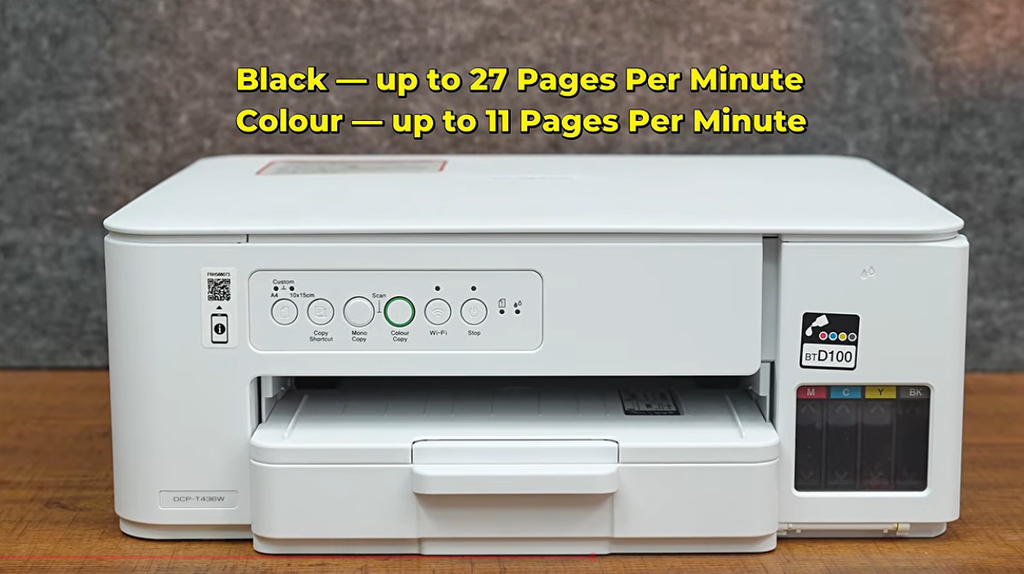
The Brother DCP-T436W is a 3-in-1 ink tank multifunction printer designed primarily for home and small-office environments.
The three main functions are:
- Printing
- Scanning
- Copying
The “W” in the model name is particularly relevant because wireless connectivity is one of the printer’s major features. You can connect the printer to a Wi-Fi network and print from compatible computers and mobile devices without keeping the printer physically connected through USB.
Brother also supports Wi-Fi Direct, allowing compatible devices to communicate with the printer without necessarily requiring a traditional wireless network connection.
This makes the DCP-T436W more flexible than a basic USB-only printer.
Design and Build Quality
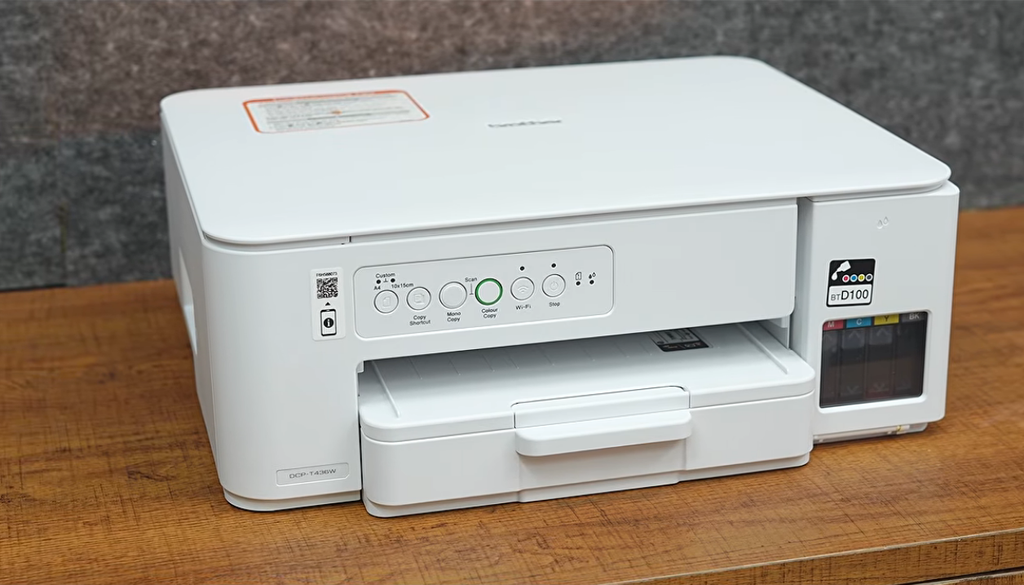
The DCP-T436W follows a relatively compact desktop design.
Its dimensions are approximately:
390 mm × 343 mm × 148.5 mm
and the printer weighs around 6.3 kg.
That relatively low height is useful if you plan to place the printer underneath a shelf or on a standard computer desk.
The design is more functional than decorative. Brother has focused on keeping the printer compact while still providing an integrated ink-tank system and front-loading paper tray.
One practical advantage is the front-access paper tray. The standard tray can hold up to 150 sheets of 80 gsm plain paper, while the output section can accommodate up to 50 sheets.
For typical home printing, a 150-sheet input capacity means you do not have to reload paper after every small print job.
Ink Tank System
One of the biggest reasons to consider the DCP-T436W instead of a traditional cartridge printer is the refillable ink-tank system.
The printer uses separate:
- Black
- Cyan
- Magenta
- Yellow
ink tanks.
Brother specifies an approximate yield of:
- Black: 7,500 pages
- Cyan: 5,000 pages
- Magenta: 5,000 pages
- Yellow: 5,000 pages
These figures are manufacturer estimates and are based on Brother’s stated test methodology using test patterns. Actual yield can vary depending on document coverage, print quality settings, images, photos, cleaning cycles, and other factors.
This distinction is important.
A manufacturer-rated 7,500-page black yield does not mean every user will get exactly 7,500 pages from one bottle.
If you mostly print documents containing text, your actual usage can be very different from someone printing large graphics, photographs, charts, or heavily filled pages.
Does the DCP-T436W Come With Ink?
Yes.
Brother lists the DCP-T436W as being supplied with full ink bottles, with quoted yields of up to approximately 7,500 black pages and 5,000 colour pages under the manufacturer’s stated testing methodology.
This is an important factor when calculating the overall value of the printer.
You are not simply purchasing the printer hardware. The initial ink supply also provides a significant number of potential prints.
However, Brother notes that the first filling/initialization process uses some ink to fill the ink delivery system. Therefore, initial bottle yield can be lower than replacement-bottle yield.
Print Speed
Brother rates the DCP-T436W at up to:
16 ipm for black-and-white printing
and
9 ipm for colour printing.
Here, ipm means images per minute, and manufacturer print-speed figures should not automatically be interpreted as the exact real-world time for every type of document.
For normal home documents such as:
- School assignments
- College projects
- Office documents
- Invoices
- Forms
- Reports
- Text-heavy PDFs
the rated speed provides a useful indication of the printer’s class.
However, printing photographs or pages with large amounts of colour coverage can take longer than simple black-text documents.
Print Quality
The DCP-T436W supports print resolutions of up to 1200 × 6000 dpi under Windows, according to Brother’s specifications.
For everyday documents, the important factor is not simply the maximum resolution number.
Print quality also depends on:
- Paper type
- Print mode
- Ink condition
- Document design
- Image quality
- Ink coverage
- Printer maintenance
For text documents, an ink-tank printer such as the DCP-T436W is primarily designed to provide practical everyday output rather than compete with specialised photo printers.
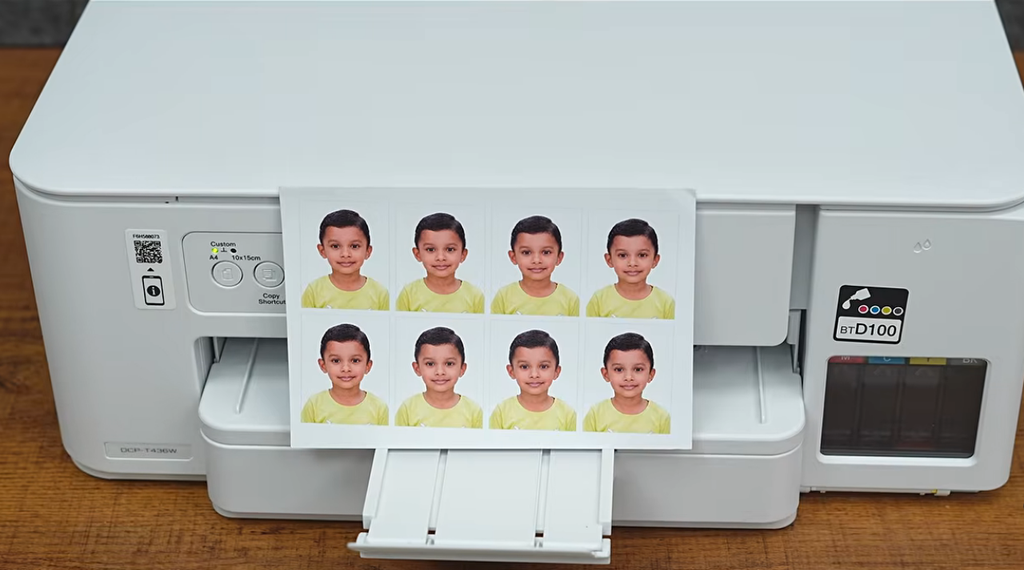
For occasional photographs and colour graphics, the printer supports compatible glossy and inkjet media.
Brother also lists borderless printing support for supported media sizes, including A4 and several photo formats.
Printing Photos
The DCP-T436W can be used for photo printing, provided you use compatible inkjet/photo paper and appropriate settings.
Supported media includes:
- Glossy paper
- Inkjet paper
- Plain paper
- Recycled paper
The standard tray supports media up to 220 gsm, while the manual feed slot supports media up to 300 gsm according to Brother’s specifications.
The manual feed slot is particularly useful when you want to print on a different type of paper without completely changing the paper in the standard tray.
The manual slot supports one sheet at a time.
That means it is useful for occasional:
- Photo paper
- Thicker paper
- Special documents
- Cards
- Other compatible media
rather than large batches.
Wi-Fi Connectivity
Wireless connectivity is one of the biggest attractions of the DCP-T436W.
The printer supports:
- Wi-Fi
- Wi-Fi Direct
- USB 2.0
- Wireless network printing
- Wireless network scanning
Brother lists IEEE 802.11a/b/g/n wireless networking and Wi-Fi Direct support for the model.
This means you can place the printer somewhere convenient in your home or office instead of keeping it directly beside your main computer.
For example, you could keep the printer in one room while family members or employees send print jobs from compatible devices on the same network.
Mobile Printing
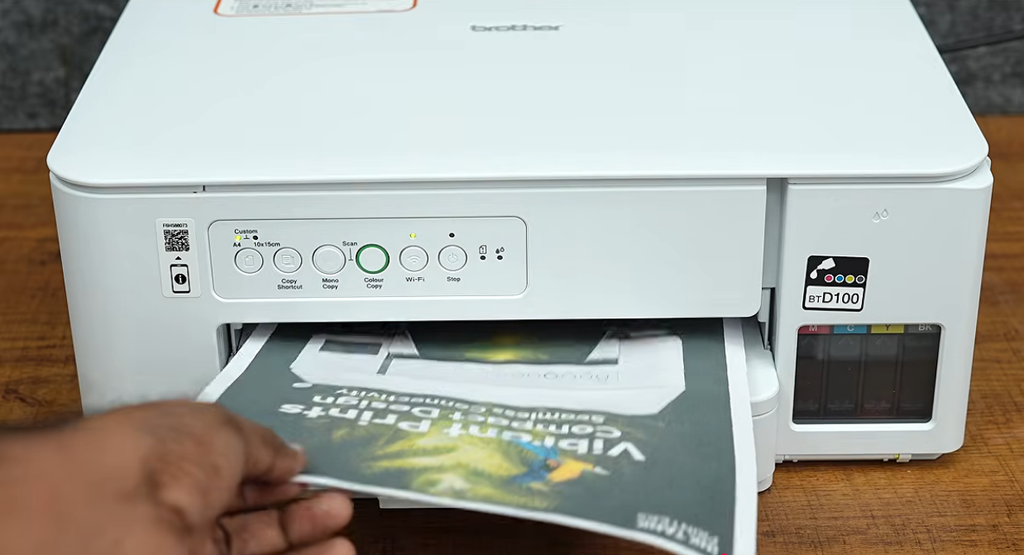
The DCP-T436W is also designed for mobile printing.
Brother supports the Brother Mobile Connect app, while the printer also supports:
- Apple AirPrint
- Mopria
- Brother Print Service Plugin
- Wireless Direct
depending on the device and operating system.
This is useful because modern users increasingly work from smartphones rather than desktop computers.
For example, you may receive a PDF on WhatsApp, email, Google Drive, or another application and want to print it without first transferring it to a PC.
A compatible mobile printing workflow can make that process much simpler.
Brother Mobile Connect App
Brother Mobile Connect is particularly useful for users who want to control basic printing and scanning tasks from their smartphone.
According to Brother’s documentation, the app supports functions such as printing from and scanning to mobile devices, previewing copies, and checking printer status.
The exact user experience can depend on:
- Android/iOS version
- Printer firmware
- Network configuration
- App version
- Phone model
Therefore, it is worth keeping the Brother application and printer firmware updated.
Scanning Features
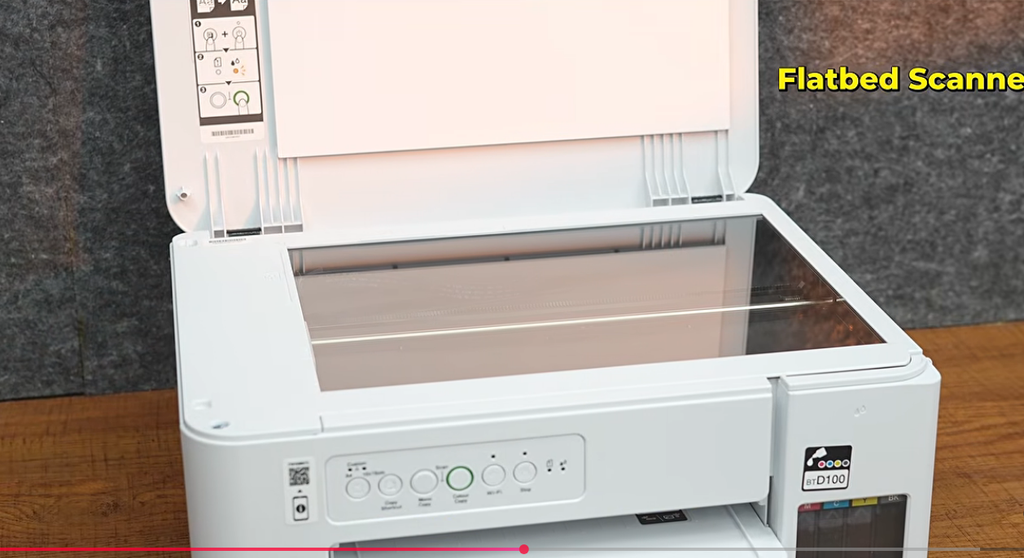
The DCP-T436W is not only a printer.
It also includes a flatbed scanner.
Brother lists an optical scanner resolution of up to:
1200 × 2400 dpi
with higher interpolated resolutions available through software in supported environments.
For normal home and office scanning, 1200 × 2400 dpi optical resolution is more than sufficient for common tasks such as:
- Documents
- Certificates
- Receipts
- ID copies
- Forms
- Photographs
- School records
The scanner supports both colour and monochrome scanning.
Scanning Documents
The flatbed design means you place a document directly on the scanner glass.
This works well for:
- Single documents
- Books
- Certificates
- Passports and similar flat documents
- Photographs
- Receipts
But if your work involves scanning dozens of pages every day, you should pay close attention to the printer’s document-feeding capabilities before purchasing.
A flatbed workflow requires placing documents manually one at a time.
That is very different from an office printer equipped with an Automatic Document Feeder.
So the DCP-T436W is more suitable for normal home/SOHO scanning rather than heavy multi-page scanning workflows.
Copying Features
The DCP-T436W can copy both monochrome and colour documents.
Brother specifies:
- Up to 99 copies
- Enlargement/reduction from 25% to 400%
- Copy resolution up to 1200 × 1800 dpi
for the model.
This makes the printer useful even when your computer or phone is not involved.
For example, if you want to duplicate a document, you can place the original on the scanner glass and use the copy controls.
Brother’s documentation also lists features such as 2-in-1 ID copying and N-in-1 copying.
These can be useful for everyday administrative work.
Paper Capacity
The standard paper tray holds up to:
150 sheets of 80 gsm plain paper.
The output tray can hold up to:
50 sheets.
There is also a one-sheet manual feed slot.
For a home user, 150 sheets is a practical capacity.
For a small office, it is acceptable for moderate printing, although businesses with continuous high-volume workloads may prefer a printer with a larger input capacity.
Supported Paper Sizes
The DCP-T436W supports a wide range of paper sizes.
These include:
- A4
- Letter
- Legal
- India Legal
- Folio
- Executive
- A5
- A6
- Photo sizes
- Index cards
- Envelopes
Support can vary by tray and paper type, so users should check Brother’s specifications before using unusual media.
Does Brother DCP-T436W Support Thick Paper?
Yes, within the manufacturer’s specified limits.
Brother lists the standard tray for media from 64 to 220 gsm, while the manual feed slot supports media from 64 to 300 gsm.
This is useful for occasional thicker documents, cards, and compatible photo media.
However, maximum supported paper weight does not mean every 300 gsm material will feed identically.
Paper construction, surface coating, stiffness and size can affect feeding.
Connectivity: USB vs Wi-Fi
The printer provides both wired and wireless options.
USB
USB is useful when:
- You mainly print from one PC
- Wi-Fi is unavailable
- You want a direct connection
Wi-Fi
Wi-Fi is useful when:
- Multiple computers use the printer
- You print from smartphones
- The printer is located away from your desk
- You want to reduce cable clutter
Wi-Fi Direct
Wi-Fi Direct can be useful when you want compatible devices to connect directly to the printer without relying on a traditional wireless network.
Having all three options gives the DCP-T436W flexibility for different environments.
Supported Operating Systems
Brother lists support for:
- Windows 10
- Windows 11
- macOS 12/13/14
- Linux
- Chrome OS
for the DCP-T436W.
Because operating systems and printer software are updated over time, users should check Brother’s current driver/download page for their specific operating system.
Brother’s India support page currently provides drivers, utilities and firmware downloads for the DCP-T436W.
Ink Cost and Running Cost
Running cost is one of the most important reasons people choose an ink-tank printer.
The DCP-T436W’s quoted ink yields are high compared with many conventional cartridge printers.
Brother rates:
Black: approximately 7,500 pages
Each colour: approximately 5,000 pages
under its stated test methodology.
However, we recommend avoiding a simplistic “cost per page” calculation based only on bottle price divided by rated page yield.
Actual cost depends on:
- Coverage per page
- Document type
- Colour usage
- Cleaning cycles
- Ink wastage
- Paper cost
- Replacement ink pricing
- Print-quality settings
For example, a page containing a few paragraphs of black text consumes much less ink than a full-page colour photograph.
Therefore, the quoted yield should be treated as a useful comparison figure rather than a guaranteed personal cost per page.
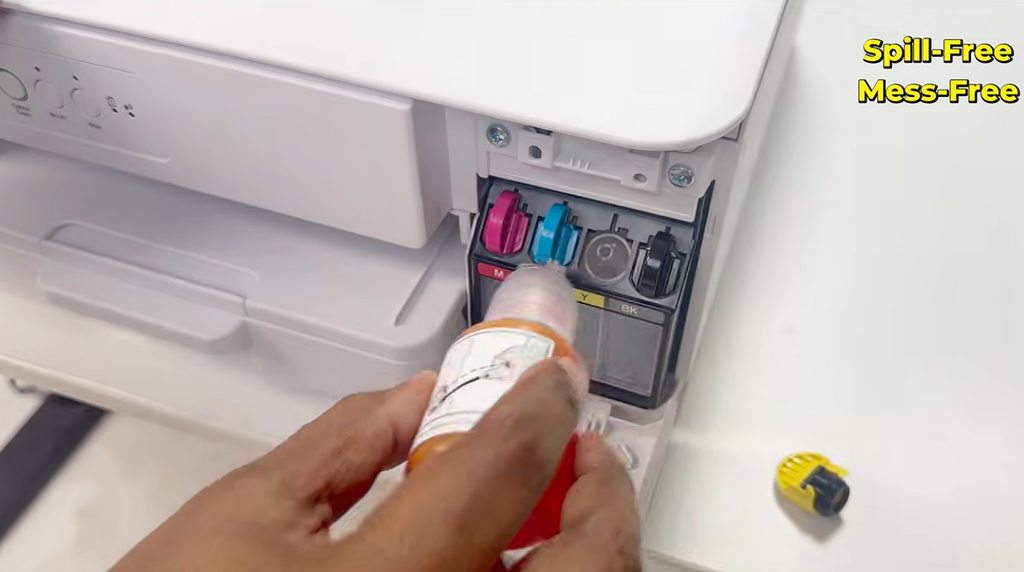
Ink Refilling
Brother has designed the ink system around front-access refilling.
The company describes the system as designed for easier and cleaner refilling, with a focus on reducing spills and making ink levels easier to monitor.
This is important because ink-tank printers require users to periodically refill the tanks.
A transparent or easily visible tank also makes it easier to notice when a colour is running low.
For the best long-term reliability, use compatible genuine Brother ink and follow the manufacturer’s instructions.
Brother’s documentation identifies the replacement bottles as:
- BTD100BK
- BTD100C
- BTD100M
- BTD100Y
with the stated approximate yields.
Maintenance
Inkjet printers require some maintenance, especially if they are used irregularly.
One important point is that the printer may perform cleaning cycles to maintain print quality.
Brother itself has an FAQ explaining why regular cleaning cycles are necessary on the DCP-T436W.
If you leave an inkjet printer unused for long periods, ink can dry around the print system.
Therefore, users who print only once every few months should understand that an ink-tank printer still benefits from appropriate maintenance.
For regular home users, occasional printing is generally more practical than leaving the machine unused for extremely long periods.
Noise and Power Consumption
Brother lists a noise level of approximately 55 dB(A) for the DCP-T436W.
Its listed power consumption is approximately:
- Ready: 2.5 W
- Sleep: 0.6 W
- Power off: 0.15 W
according to Brother’s specifications.
Actual electricity consumption depends on operating conditions and usage patterns.
Warranty and Rated Machine Life
Brother states that the DCP-T436W is designed for home and SOHO usage with a rated life of up to:
1 year or 30,000 pages, whichever comes first.
This should not be interpreted as a promise that the printer will physically stop functioning after exactly 30,000 pages.
Instead, it is the manufacturer’s stated usage/life or warranty-related specification.
Always check the warranty terms applicable to the unit you purchase in India.
What We Like About the Brother DCP-T436W
1. Print, Scan and Copy in One Machine
You do not need separate devices for basic document printing, scanning and copying.
This makes the printer practical for home users, students and small offices.
2. Wi-Fi Connectivity
Wireless printing eliminates the need to keep the printer permanently connected to one computer.
3. Mobile Printing
Support for Brother Mobile Connect, AirPrint and Mopria makes the printer suitable for smartphone-oriented workflows.
4. High Quoted Ink Yield
The approximately 7,500-page black yield and 5,000-page colour yield per colour are significant features of the printer.
5. 150-Sheet Paper Tray
The 150-sheet standard tray is convenient for everyday document printing.
6. Compact Body
At 390 × 343 × 148.5 mm, the printer is relatively compact for a multifunction ink-tank model.
7. Multiple Connectivity Options
USB, Wi-Fi and Wi-Fi Direct provide flexibility depending on your setup.
Things to Consider Before Buying
No printer is perfect, and the DCP-T436W has limitations that buyers should understand.
No Automatic Document Feeder for High-Volume Scanning
The DCP-T436W uses a flatbed scanning workflow, so users scanning large batches of documents should consider a printer/scanner with an ADF.
This is one of the biggest considerations for office users.
No Automatic Duplex Printing
If automatic two-sided printing is important to you, check the specifications carefully before purchasing.
Brother specifically promotes auto two-sided printing on some other models in its range, such as the DCP-T530DW, while the DCP-T436W’s listed specifications do not include automatic duplex printing.
Therefore, users who regularly print large two-sided reports should consider whether a duplex-equipped model better matches their workflow.
Inkjet Maintenance
Like other inkjet printers, it is not ideal to completely ignore the printer for very long periods.
Regular use and proper maintenance can help maintain print quality.
Real-World Ink Cost Varies
Do not calculate your personal cost per page solely from the manufacturer’s quoted yield.
Heavy graphics and photographs consume considerably more ink than normal text documents.
Brother DCP-T436W for Students
For students, the DCP-T436W offers a useful combination of features.
Students commonly need to print:
- Assignments
- Project reports
- Notes
- Question papers
- Forms
- Certificates
- Colour charts
- Presentations
The wireless functionality can also be convenient when documents are stored on a phone.
The large quoted ink yield is another useful feature for students who print regularly throughout an academic year.
Brother DCP-T436W for Home Use
For home users, the printer makes sense when printing requirements include more than occasional documents.
For example:
- School work
- Children’s worksheets
- Government forms
- Insurance documents
- Bills
- Colour documents
- Scanned certificates
- Photocopies
The combination of print, scan and copy means one machine can handle several household tasks.
If you only print five or ten pages every few months, however, you may not need an ink-tank multifunction printer of this type.
Brother DCP-T436W for Small Offices
The printer can also be considered for small offices and SOHO environments.
The 150-sheet tray and wireless networking are useful for everyday office documents.
However, businesses should consider their actual workload.
If your office requires:
- Large-volume scanning
- Automatic document feeding
- Automatic duplex printing
- Very high monthly printing
- Multiple employees printing continuously
then a higher-end business printer may be more appropriate.
The DCP-T436W is better positioned as a compact home/SOHO multifunction device.
Who Should Buy the Brother DCP-T436W?
The DCP-T436W makes sense for users who want:
- Print + Scan + Copy
- Wi-Fi printing
- Smartphone printing
- High ink yield
- A refillable ink-tank system
- A compact printer
- Moderate home or small-office printing
- Colour printing
- USB and wireless connectivity
It is particularly relevant if wireless printing and low-frequency ink replacement are more important to you than advanced office automation.
Who Should Not Buy It?
You may want to consider another printer if your main requirement is:
- Automatic duplex printing
- High-volume multi-page scanning
- ADF-based document processing
- Large corporate workloads
- Heavy daily printing across many users
In these situations, look for a model specifically designed around those requirements.
Brother DCP-T436W vs Traditional Cartridge Printer
The biggest conceptual difference is the ink system.
Traditional cartridge printers generally use replaceable cartridges.
The DCP-T436W uses refillable ink tanks.
For users who print regularly, the tank approach can reduce the frequency of ink replacement because the quoted page yields are high.
But the initial printer price can be higher than very basic cartridge-based printers.
Therefore, the correct comparison should consider the total cost of ownership, not simply the purchase price.
Brother DCP-T436W: Is ₹16,190 Worth Considering?
Brother’s current India-listed MRP is ₹16,190 including taxes.
Whether that price represents good value for you depends heavily on your printing requirements.
If you need only a basic black-and-white printer for a few pages each month, spending more on an ink-tank multifunction printer may not be necessary.
But if you regularly need:
- Black-and-white printing
- Colour printing
- Scanning
- Copying
- Wi-Fi
- Mobile printing
- Large ink capacity
then the DCP-T436W offers a broad feature set in one machine.
Actual street prices can be lower than MRP during retailer promotions, so buyers should compare the current selling price and the cost of genuine replacement ink before purchasing.
Brother DCP-T436W Review: Our Practical Take
The Brother DCP-T436W is designed around a straightforward idea: provide the essential functions most home and small-office users need without making the printer unnecessarily complicated.
Its strongest features are the combination of:
Print + Scan + Copy + Wi-Fi + Mobile Printing + Ink Tank.
The quoted ink yields are another major advantage for users who print frequently. Brother rates the black bottle at approximately 7,500 pages and each colour bottle at approximately 5,000 pages under its stated methodology.
The printer is also relatively compact, supports a 150-sheet paper tray, and provides USB as well as wireless connectivity.
At the same time, potential buyers should understand what it is not designed to be.
It is not a high-end office document-processing machine.
If your workflow depends heavily on automatic two-sided printing or automatic multi-page scanning, you should consider a model with those features.
For everyday home printing, student requirements, work-from-home documents, and moderate small-office usage, the DCP-T436W’s feature set is focused and practical.
Frequently Asked Questions
Is Brother DCP-T436W a laser printer?
No. The DCP-T436W is an ink-tank printer. It uses separate black, cyan, magenta and yellow ink tanks.
Does Brother DCP-T436W support Wi-Fi?
Yes. It supports wireless networking and Wi-Fi Direct.
Can I print from my phone?
Yes. Brother supports mobile printing through Brother Mobile Connect, while AirPrint and Mopria are also supported.
Can it scan documents?
Yes. It has a flatbed scanner with optical resolution up to 1200 × 2400 dpi.
Can it make photocopies?
Yes. It supports both colour and monochrome copying.
How many pages can the black ink print?
Brother quotes approximately 7,500 pages for the black replacement bottle under its stated test methodology. Actual yield varies by usage.
How many colour pages can it print?
Brother quotes approximately 5,000 pages for each cyan, magenta and yellow bottle under its stated methodology.
What is the maximum paper capacity?
The standard tray supports up to 150 sheets of 80 gsm plain paper.
Can it print on thick paper?
The manual feed slot supports compatible media up to 300 gsm according to Brother’s specifications.
Does it support USB?
Yes. It includes a Hi-Speed USB 2.0 interface.
Does it support Windows 11?
Yes. Brother lists Windows 10 and Windows 11 among the supported operating systems.
Does it support macOS?
Yes. Brother lists macOS versions 12, 13 and 14 in its current product specifications.
Is it suitable for students?
Yes, particularly for students who need regular document printing, scanning, copying and wireless/mobile printing.
Is it suitable for a small office?
It can be suitable for moderate SOHO workloads, but businesses requiring ADF scanning, automatic duplex printing or heavier document-processing workloads should consider higher-end models.
What is the price of Brother DCP-T436W in India?
Brother India’s current listed MRP is ₹16,190 including taxes. Retail prices may vary.
Final Specifications
| Category | Details |
|---|---|
| Model | Brother DCP-T436W |
| Type | Ink Tank Multifunction |
| Functions | Print / Scan / Copy |
| Black Speed | Up to 16 ipm |
| Colour Speed | Up to 9 ipm |
| Print Resolution | Up to 1200 × 6000 dpi |
| Optical Scan Resolution | Up to 1200 × 2400 dpi |
| Copy Resolution | Up to 1200 × 1800 dpi |
| Standard Paper Tray | 150 sheets |
| Manual Feed | 1 sheet |
| Wi-Fi | Yes |
| Wi-Fi Direct | Yes |
| USB | Hi-Speed USB 2.0 |
| Mobile Printing | Brother Mobile Connect / AirPrint / Mopria |
| Black Yield | Approx. 7,500 pages |
| Colour Yield | Approx. 5,000 pages per colour |
| Dimensions | 390 × 343 × 148.5 mm |
| Weight | 6.3 kg |
| Warranty/Life Rating | 1 year or 30,000 pages |
| India MRP | ₹16,190 incl. taxes |
Specifications can change with firmware, regional variants, software updates or manufacturer revisions, so buyers should verify the final specifications on Brother India’s product/support page before purchasing.
Conclusion
The Brother DCP-T436W is a feature-focused wireless ink-tank multifunction printer aimed at users who want more than basic printing.
Its combination of print, scan, copy, Wi-Fi, Wi-Fi Direct, mobile printing, a 150-sheet paper tray and high quoted ink yields makes it suitable for many home and small-office environments.
The biggest advantages are its wireless flexibility, refillable ink system, compact design and combination of three core functions.
The biggest considerations are the lack of features aimed at more demanding office workflows, particularly automatic document feeding and automatic duplex printing.
If your priority is regular home or SOHO printing with wireless connectivity and low-frequency ink replacement, the DCP-T436W deserves to be on your shortlist.
If you need heavy office automation, automatic two-sided printing or high-volume multi-page scanning, compare it with models that specifically provide those features before making a purchase.
Brother DCP-T436W — a practical 3-in-1 Wi-Fi ink-tank printer for everyday home and small-office printing.

Other Articles

9 Useful Gadgets Under 500/- For Daily Use
8GB vs 12GB RAM: Which Smartphone RAM Is Better in 2026?

No Comment! Be the first one.